Cheat sheet
The panel
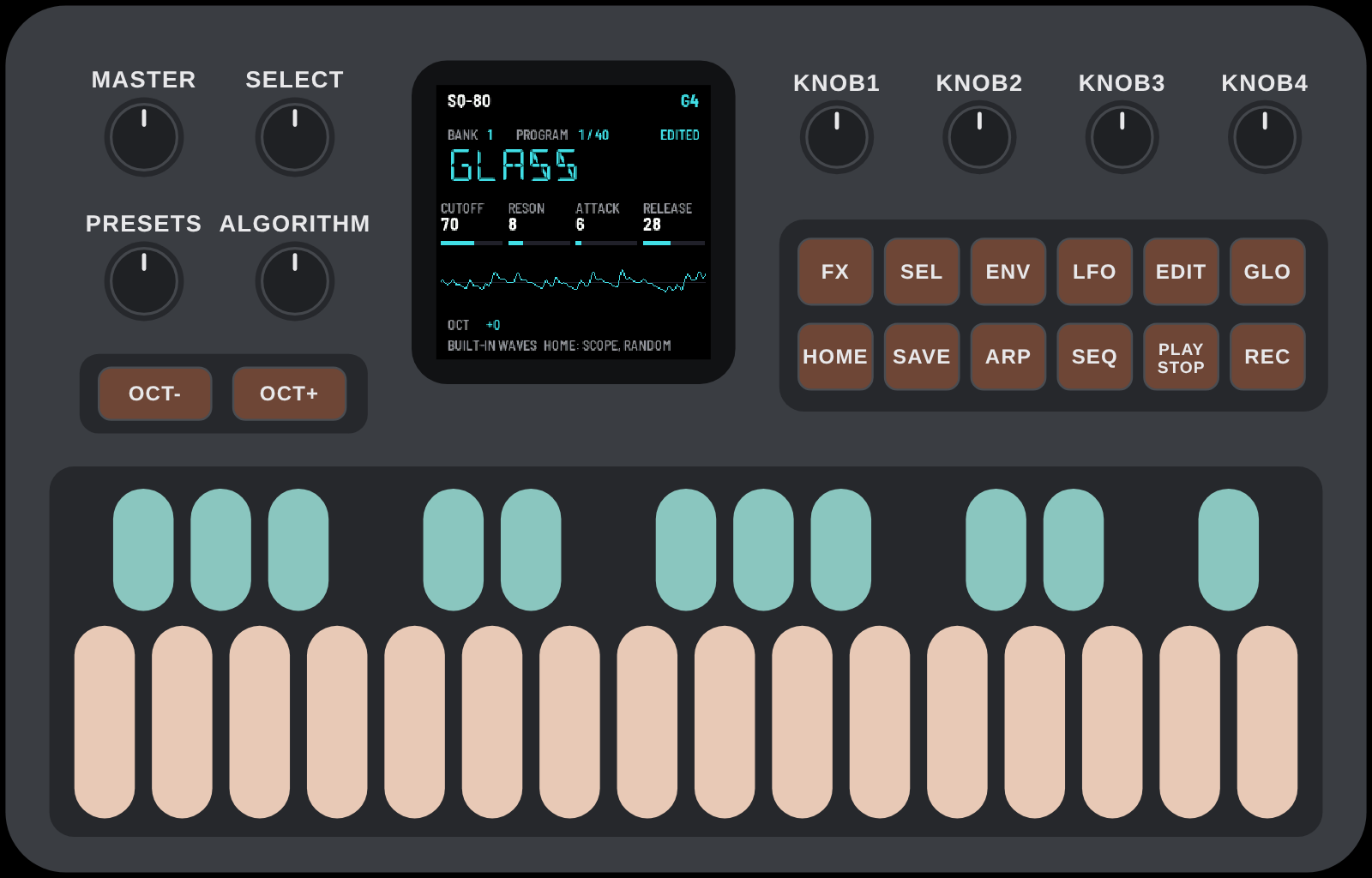
| PRESETS | next / previous program |
| SELECT | next / previous bank (1–8) |
| ALGORITHM | next / previous page of the screen you are on |
| KNOB 1–4 | the four values along the middle of the screen |
| MASTER | volume |
| OCT− OCT+ | the keys' octave |
| HOME | back to playing · on the playing screen: the scope, then RANDOM |
| SEL ENV LFO EDIT | edit the sound (right) |
| FX | the effects |
| SAVE | store the program |
| ARP | tap: on / off · hold: its pages |
| SEQ | the step sequencer · hold: the keys are steps |
| PLAY REC | start / stop · record |
| GLO | settings and the CPU load |
Playing
| K1–K4 | CUTOFF | RESON | ATTACK | RELEASE |
The program's own filter, and ENV 4's attack (T1) and release (T4). A CYAN name has unsaved changes. The last note played shows top right.
HOME: scope · RANDOM
HOME on the playing screen: the scope (the waveform, large), again: RANDOM, again: back.
| RANDOM | AMOUNT | PARTS | NEW | STORED |
AMOUNT 5–100 % (how far values move) · PARTS: ALL, OSC, FILTER, ENV, LFO, MOD · NEW: right a new program, left the one before (8 kept) · STORED: back to the program as stored. Named RND001…; keep one with SAVE.
Editing: four buttons, ALGORITHM turns the pages
| Page | K1 | K2 | K3 | K4 |
|---|---|---|---|---|
| SEL · OSC 1 → 2 → 3 (press again) | ||||
| PITCH | OCT | SEMI | FINE | WAVE |
| PITCH MOD | MOD 1 | DEPTH 1 | MOD 2 | DEPTH 2 |
| DCA | LEVEL | OUTPUT | MOD 1 | DEPTH 1 |
| DCA MOD 2 | MOD 2 | DEPTH 2 | ||
| ENV · ENV 1 → 4 (ENV 4 is the volume) | ||||
| LEVELS | L1 | L2 | L3 | LV |
| TIMES | T1 | T2 | T3 | T4 |
| KEY | T1V | TK | R2 | |
| LFO · LFO 1 → 3 | ||||
| WAVE | FREQ | WAVE | L1 | L2 |
| MORE | DELAY | MOD | HUMAN | RESET |
| EDIT · the program | ||||
| FILTER | FREQ | RES | KEYBD | |
| FILTER MOD | MOD 1 | DEPTH 1 | MOD 2 | DEPTH 2 |
| OUTPUT | FINAL | PAN | PAN MOD | DEPTH |
| MODES | SYNC | AM | MONO | GLIDE |
| RESTART | VC | ENV RS | OSC RS | CYC |
| NAME 1–4 · 5–6 | one letter per knob | |||
| SPLIT/LAYER | LAYER | SPLIT | SPL LYR | SPL KEY |
Modulation sources: LFO1–3, ENV1–4, VEL, VELX, KBD, KBD2, WHEEL, PEDAL, XCTRL, PRESS, OFF. LV / T1V: velocity on levels / attack · TK: keys shorten times · R2: second release. SPLIT/LAYER partners are programs of the same bank, by place (OFF: none); all share the eight voices. HOME leaves with the changes kept, not saved.
Effects: FX, again or ALGORITHM for each
| Page | K1 | K2 | K3 | K4 |
|---|---|---|---|---|
| LEVELS | REVERB | DELAY | CHORUS | DRIVE |
| REVERB | TYPE | DECAY | TONE | MIX |
| DELAY | TYPE | TIME | FEEDBK | MIX |
| CHORUS | TYPE | DEPTH | RATE | MIX |
| DRIVE | TYPE | TONE | OUTPUT | GAIN |
Reverb: ROOM, HALL, PLATE, SPRING, CLOUD · Delay: ANALOG, DIGITAL, TAPE, P-PONG, MULTI, SLAP, REVERSE, A-SYNC (in time with the tempo) · Chorus: STEREO, JUNO, MULTI · Drive: SOFT, TUBE.
Saving
SAVE from any screen · SELECT or K1: the bank · PRESETS or K2: the place (the screen shows what you would replace) · SAVE again stores · HOME cancels.
The bank, program, octave, effects, arpeggiator and sequencer remember themselves a few seconds after a change.
Arpeggiator
ARP tap: on / off · hold the keys to arpeggiate · hold ARP: its pages.
| PATTERN | MODE | RATE | OCTAVES | GATE |
| FEEL | SWING | HOLD | ORDER | CHANCE |
| TEMPO | TEMPO | MIDI CLK | ARP |
MODE: UP, DOWN, UP/DN, RANDOM, ORDER, REPEAT, DN/UP, UP+8, CONV, DIVG, PINKY, THUMB, WALK, CHORD · RATE 1/4…1/32, triplets · OCTAVES 1–4. It follows the sequencer's beat; recording takes its notes.
Sequencer: up to 64 steps
| STEP | STEP | NOTE | TIME | FLAG |
| PATTERN | LENGTH | DIV | GATE | SWING |
| TEMPO | TEMPO | MIDI CLK | ||
| step held | NOTE | VELOCITY | RATCHET | TYPE |
- SEQ: STEP entry: play a note or chord (up to 4) into the marked step; let go, the mark moves on. K3: NOTE, TIE, REST · K4: accent, slide.
- Hold SEQ (or tap it again): the 16 white keys are steps 1–16; the first 4 black keys (or OCT−/+) choose the page of 16. Press an empty step: the last note · press a full one and let go: clear · hold it and turn K1–K4.
- PLAY start / stop (it flashes on the beat) · REC while playing: record, layer on layer · REC stopped: armed, your first note starts.
- Hold REC 2 s: clear · EDIT+OCT− undo · EDIT+OCT+ redo.
GLO
CPU now and PEAK, XRUN (should stay 0), voices, cores · GLO again: peak to 0 · PLAY here: all 8 voices, a test.
| GLO | CLICK | MIN VEL |
CLICK: OFF, REC, ON · MIN VEL: the softest the keys play (0–127).
MIDI · the web pages
In over USB, the MIDI jack and Bluetooth, any channel: notes, velocity, bend, aftertouch, mod wheel, sustain, program changes, clock. The keys send over USB and Bluetooth.
Install · Load (ROM pack, banks) · Editor (every value, live) · Librarian · Emulator · ROM pack · Wave pack · Backup (banks, pattern, settings to a file): Chrome or Edge, FM-1 on USB. 8 banks × 40 programs: bank 1 the factory bank (until you store one there), the rest for your .syx banks; an empty place plays INIT.